
How to Learn CLL Algorithms
Quick answer
Learn CLL after you can build a complete first layer on 2x2 reliably. CLL has two steps: solve one layer, then recognize the remaining last-layer corner case and solve it with one algorithm. Learn the 42 cases in visual groups, begin with cases you already know from Ortega or 3x3 OLL, and use recognition-first spaced repetition before adding full-speed solves.
On this pageMake sure CLL is the right next step
Make sure CLL is the right next step
CLL is a strong next step when your 2x2 first layer is dependable and your current method is starting to feel limited by its last-layer steps. It is not the best first method for learning the puzzle. If you are still rebuilding the first layer from scratch, a beginner layer-by-layer approach gives you a more stable foundation. If you can make one face but not a complete layer, Ortega is often the more natural bridge because it separates first-face work from last-layer orientation and permutation.
Do not choose CLL because an arbitrary average says you are ready. Choose it when you can inspect a scramble, build a complete first layer without repeatedly stopping to remember the method, and leave the last four corners in a state you can recognize. The goal is to move your thinking into recognition and execution rather than spend every solve repairing the first step.
Before you start, make a short checklist: you know basic 2x2 notation, you can hold the solved layer consistently, you can identify the unsolved layer without rotating randomly, and you have a way to review algorithms with a case image. Those habits matter more than trying to memorize a large list in one weekend.
Understand the two-step CLL structure
The CLL method has a simple outline: make one complete layer, then solve the remaining layer with one CLL algorithm. J Perm describes CLL as a 42-algorithm method and places it after Ortega in the usual 2x2 progression. The simplicity is deceptive. The second step is only one algorithm, but you must identify the case quickly and choose the correct setup before turning.
Keep the word layer precise. A solved face is not automatically a solved layer: the side colors around that face must also line up. During practice, pause after making the first layer and check all four side stickers. If the layer is incomplete, do not label the result a CLL case. Fixing that distinction early prevents you from learning algorithms for positions that do not match the case diagrams.
Your first practical target is not speed. It is a repeatable transition: finish the first layer, orient the cube the same way every time, identify the top-corner pattern, and execute the selected algorithm without changing your grip halfway through. Once that loop feels automatic, recognition speed becomes much easier to train.
Learn the case groups before the algorithms
Do not approach CLL as 42 unrelated flash cards. The standard reference organizes cases into visual families such as U, T, L, S, inverse-S, H, and pi. The names are less important than the habit they create: look for a sticker pattern, classify it, then narrow your choice to a small group. Recognition becomes much more durable when the case has a visual identity instead of only a long move string.
Start by studying the solved-layer orientation and the top view used by your reference. Make a small case map with one picture for each family. Mark bars, headlights, matching stickers, and the direction of the unmatched corners. You are not trying to memorize every sticker at once. You are building a consistent question: what pattern do I see, and which family does it belong to?
Use the same orientation while learning, then add AUF and rotations deliberately. If you change the way you hold the cube for every new case, you may memorize a picture without learning how to find it in a real solve. Recognition should survive a U, U-prime, or U2 adjustment because real scrambles will not present every case in the diagram's default position.
Build a 42-case learning order
A useful first pass is to separate familiar cases from genuinely new ones. J Perm notes that nine CLL algorithms come from the Ortega method and that many others are also familiar from 3x3 OLL. Learn those overlap cases first, but verify the exact 2x2 case and algorithm rather than assuming a 3x3 sequence transfers unchanged in every grip.
Then work through one visual family at a time. A manageable session might introduce four or five cases, review the cases from yesterday, and finish with a mixed recognition test. The number is a starting point, not a rule. If four cases blur together, reduce the batch. If you can recognize and execute five cleanly across several sessions, add the next group.
- Day 1: learn the case image, name, setup, and algorithm for a small batch.
- Day 2: recall the algorithms from images before looking at notation, then execute slowly.
- Day 3: mix the new cases with older families and remove the case labels.
- End of week: run random cases and record recognition errors separately from execution errors.
Keep a case log with three columns: recognized, recalled, and executed. A case that you recognized but could not execute needs algorithm repetition. A case you executed correctly after seeing the name but could not identify from the cube needs recognition work. Treating those as different problems saves a lot of unfocused repetitions.
Train recognition before turning speed
Use recognition-only drills before full solves. Scramble a 2x2, make the first layer, stop the timer, and give yourself a short moment to name the CLL family and case. Then reveal the algorithm and execute it. This isolates the part that full solves hide: many slow CLL solves are not caused by finger tricks, but by spending too long deciding what the case is.
After recognition is stable, add execution drills. Do a few repetitions slowly enough to keep the cube aligned. Check that your grip, regrips, and rotation match the algorithm you intended to learn. Only then increase turning speed. Fast repetitions of a wrong setup create a strong memory for the wrong case, which is harder to remove than a slow first pass.
Practice mirrors and AUF separately. If the same case appears with a different top-layer offset, say the offset out loud before starting. If you always rotate the cube until the pattern looks familiar, you may get quick drills but weak solve recognition. The point of the exercise is to make the visual decision portable across scrambles, not to memorize one convenient presentation.
Use spaced repetition to retain CLL
CLL rewards short, repeated review more than occasional marathon sessions. Put difficult cases back into rotation after a miss, but keep easy cases in the deck so recognition does not become dependent on the order you learned. A good review session mixes image-to-name recall, image-to-algorithm recall, slow execution, and a few timed 2x2 solves.
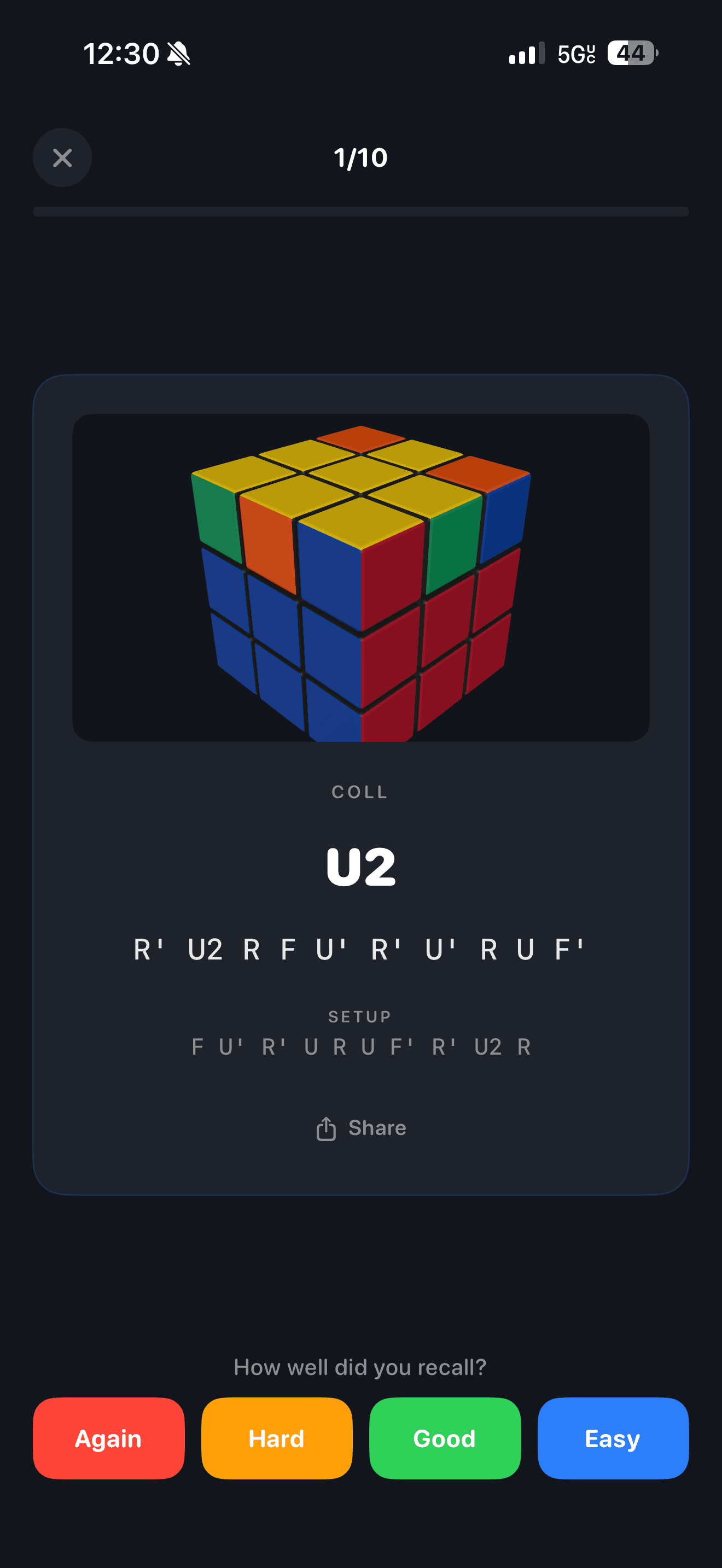
CuberPal currently lists CLL among its algorithm practice sets and describes spaced-repetition practice, progress tracking, and 2x2 timer support in its App Store listing. That makes the algorithm-practice screen a relevant place to run this workflow: use the case quiz to test recognition, mark a case only after you can recall it, then use the timer to see whether the case survives inside a complete solve. The app is a practice aid, not a substitute for understanding the case map.
Track the right metrics. Record how many cases you recognized without help, how many algorithms you recalled from the picture, and how often you paused during execution. For timed solves, look at an average rather than celebrating one lucky single. Your aim is a smaller gap between recognition and execution, followed by a smaller gap between practice cases and real solves.
Transfer CLL into competition-style solves
The World Cube Association lists 2x2x2 as an official event with Average of 5 as the full-round format. You can use that structure as a simple transfer test: inspect normally, make the first layer without stopping to search a case sheet, recognize CLL, and record all five attempts. Keep the round honest by writing down misses and slow recognitions instead of restarting every time a case feels uncomfortable.
Review the round by failure type. If the first layer was slow, return to first-face or first-layer efficiency. If the CLL case was identified late, return to recognition-only drills. If recognition was instant but execution was poor, isolate the algorithm and practice its grip. This loop keeps CLL from becoming a list of algorithms disconnected from the skill of solving a 2x2 quickly.
You do not need to finish all 42 cases before CLL becomes useful. Start with a small, reliable subset, keep reviewing the cases you know, and add coverage without letting recognition quality collapse. A complete set is the long-term destination; consistent decisions under inspection are the skill that makes the set valuable.
Continue the learning path
Beyond 3x3
Pick one event that feels fun enough to practice consistently.
Open this topic clusterTurn this into practice
CuberPal combines a WCA-style timer, AI solve analysis, CFOP lessons, algorithm catalogues, spaced repetition, and a camera cube solver so speedcubing advice becomes a daily training loop.
Frequently asked questions
How many algorithms are in CLL?
The standard 2x2 CLL method uses 42 algorithms to solve the last layer after you have built one complete layer. You do not have to learn all 42 at once: organize them by visual family and add them in small, regularly reviewed batches.
Should I learn CLL before Ortega?
Usually no. Ortega gives you a practical 2x2 method with a smaller last-layer workload and helps you build the recognition and turning habits that make CLL easier. Learn CLL when your first layer is reliable and you want a one-algorithm finish.
How should I practice CLL recognition?
Make the first layer, stop before turning, name the visual case or family, and only then reveal the algorithm. Mix familiar and new cases, include different U-layer offsets, and record recognition mistakes separately from execution mistakes.
Can CuberPal help me practice CLL?
CuberPal's current App Store listing says it includes CLL algorithm practice with spaced repetition and progress tracking, plus a 2x2 timer. Use those tools to quiz recognition and measure transfer, while keeping the case diagrams and method logic clear in your own notes.
Sources and fact checks
- [1]J Perm: 2x2 How to Get Faster — Supports the CLL definition as a two-step 2x2 method, the 42-algorithm count, its relationship to Ortega and EG, and the fact that some CLL cases overlap with Ortega and 3x3 OLL.
- [2]Speedsolving.com Wiki: CLL Algorithms (2x2x2) — Supports the case-family organization used for recognition practice, including U, T, L, S, inverse-S, H, and pi groupings, plus the notation context for the reference list.
- [3]World Cube Association Regulations — Supports the competition context that 2x2x2 is an official WCA event and that its full-round format is Average of 5.
- [4]CuberPal US App Store Listing — Supports the current product claim that CuberPal offers CLL algorithm practice, spaced-repetition training, progress tracking, and 2x2 timer support.